The new Copilot Studio experience can consume Copilot Credits without you noticing
Why the new agent creation experience in Copilot Studio deserves attention, what I verified through hands-on tests on consumption, blocking and drafts, and why the most effective answer is not chasing agents but governing capacity upstream, by allocating Copilot Credits per environment.
In this article16sections
- Something that worried me
- It is not just a new interface
- The most natural path may not be the expected one
- Prepaid Copilot Credits are not the only problem: watch out for Pay-As-You-Go
- Another important point: a personal licence does not always cover usage
- What I verified with hands-on tests
- Consumption starts during build and test, and it can be tracked by channel
- Blocking an agent works, and lets you act without deleting it
- A draft agent that has never been published can only be deleted
- A problem I have already seen escalate on large tenants
- The smartest solution: do not chase agents, govern capacity
- Allocate Copilot Credits per environment, not at tenant level
- Also govern who can access Copilot Studio
- What is still worth doing
- In summary
- Microsoft references
Something that worried me
Over the last few days I was working on a few new agents in Copilot Studio and decided to switch on the new experience Microsoft has introduced.
At first glance it looks like nothing more than an interface refresh: a more modern look, a more linear creation path, an authoring experience much closer to the one GitHub Copilot has got us used to in recent months. Nothing dramatic, I told myself. A restyle, like so many others we have seen in Microsoft 365 over the years.
Then I stopped for a moment and took a closer look at the start screen.
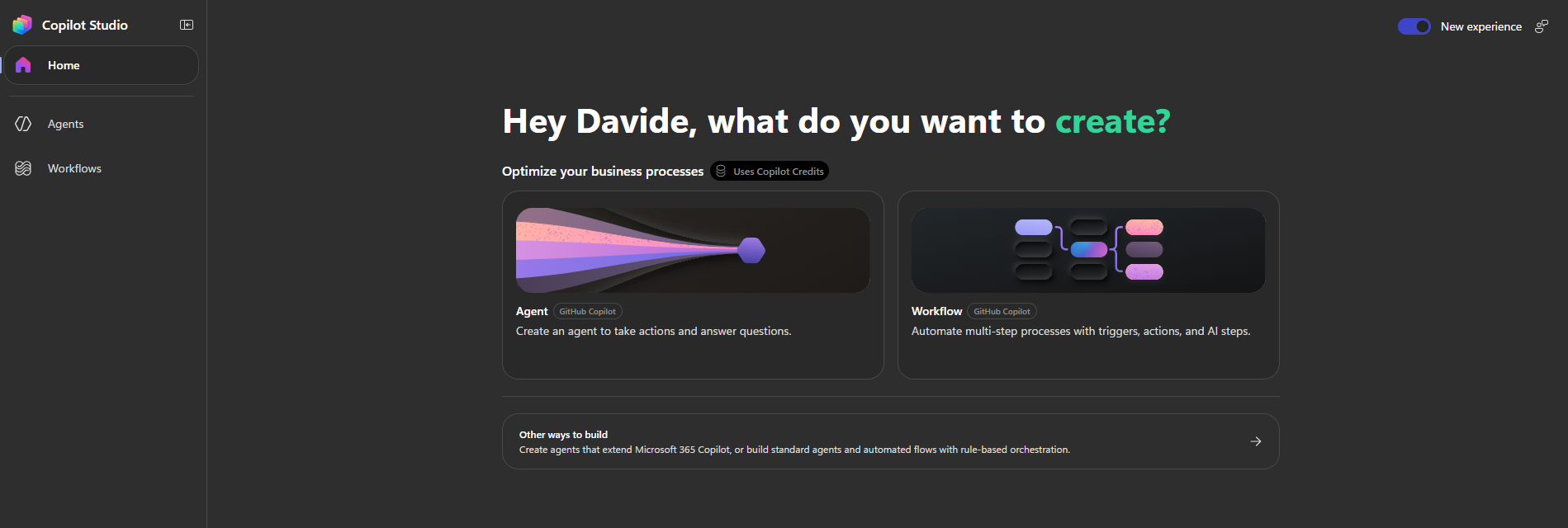
The most prominent options are Agent and Workflow. Just above them sits a rather discreet badge: Uses Copilot Credits.
Technically, the message is there. You cannot say Microsoft has hidden it. But it is precisely its discretion that worries me: in an interface designed to be as smooth and natural as possible, a four-word badge is likely to be simply ignored by anyone who does not even know what Copilot Credits are, or how their own tenant is managing them. So I decided to dig deeper, first by reading the documentation and then by testing the platform’s behaviour myself.
This article walks through exactly that journey: what I found out, what I verified with hands-on tests, and which governance strategy I currently consider the most effective for handling this change.
It is not just a new interface
Looking at the start screen, the temptation is to file the whole thing away as a cosmetic update. In reality, Microsoft has introduced a new way of creating agents and workflows that uses a consumption model completely different from the one many administrators were used to.
Two Message Center posts tell the timeline of this change rather well.
The first, MC1446644, announces the general availability of the new creation mode from 3 August 2026. The message is clear: agents created with this mode use a billing model based on Copilot Credits, while traditional agents and those designed to extend Microsoft 365 Copilot Chat keep their respective licensing models unchanged. It also spells out a crucial detail: agents created before general availability were given a grace period, but from 1 September 2026 they too started consuming credits in full.
The second post, MC1461678, is the announcement of that very deadline: billing for agents created with this mode, including those created during the preview phase, comes into effect from 1 September 2026.
Placed side by side, these two posts tell a precise story: a grace period meant to give organisations time to adapt, followed by billing being switched on for things that were created months earlier as well, perhaps as an experiment, perhaps forgotten in a corner of some Power Platform environment.
So we are not talking about a simple redesign of the designer. We are talking about a new way of building, more powerful and more immediate, but tied to a consumption model that needs to be monitored with the same care we give, for example, to a pay-as-you-go Azure subscription.
The most natural path may not be the expected one
Things get even more interesting the moment you select New agent.
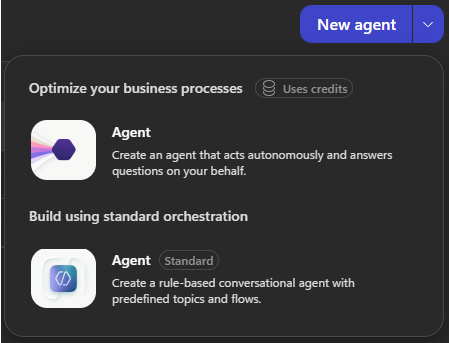
The menu shows two options. The first, Agent, is the most prominent one, comes with the Uses credits badge, and lets you create an agent based on the new mode. The second, Agent (Standard), lets you create the classic conversational agent based on topics and predefined flows, the same one we have known for years.
Let us put ourselves for a moment in the shoes of a maker opening Copilot Studio for the first time, perhaps a few days after being assigned an M365 Copilot licence. Which of the two options will they pick?
In the vast majority of cases, the first. Not because they understand the functional and economic differences between the two modes, but because it is the one offered at the top, the one with the more polished look, the one that seems to be “the right, modern way” of doing things.
The standard agent has not disappeared. It has simply become the second choice, the one that requires an extra, deliberate step. And in an interface designed to reduce friction, every extra step is a step that a sizeable share of users simply will not take.
Prepaid Copilot Credits are not the only problem: watch out for Pay-As-You-Go
So far the reasoning has focused on consuming a pool of prepaid Copilot Credits, coming from the purchase of Copilot Studio licences. But there is a scenario I consider even more delicate: tenants that use a Pay-As-You-Go payment model.
In that case we are no longer talking about consuming capacity that has already been bought and is therefore, in a sense, already “spent” regardless. We are talking about a cost that accrues in real time, directly on a linked Azure subscription. A user who creates, tests and experiments with agents in the new mode, in a tenant configured for consumption billing, is generating real and immediate spend, not simply “consuming” a resource paid for in advance.
If consumption of a prepaid pool can already go unnoticed, in a Pay-As-You-Go scenario the financial risk is objectively higher, because there is not even the “cushion” of a fixed monthly capacity. It is one of the first things we should check as administrators: whether the tenant we manage relies on prepaid credits or on a consumption model, because the severity of the risk changes considerably between the two scenarios.
Another important point: a personal licence does not always cover usage
Then there is something I discovered by testing the platform myself, and which I consider the most insidious point of the whole discussion.
For traditional agents (standard or Copilot Chat), if a user with a Copilot Studio or M365 Copilot licence creates an agent and uses it only for themselves, without sharing it with people who do not have a Copilot licence, their own licence covers the usage. Neither a shared credit pool nor a Pay-As-You-Go budget is touched: it is individual use, covered individually.
With agents created through the new mode, this is no longer true. Even an agent created and used exclusively in a personal environment, by a single user, with no sharing at all, still consumes Copilot Credits from the tenant pool.
This is exactly what I verified by analysing the consumption of one of my test agents:

The agent lived in my personal environment ([Personal] Ambiente di Davide Bianchi) and was not shared with anyone, yet the consumption detail pane clearly shows credits billed on both the M365 Copilot channel and the pva-studio channel (the authoring/test environment), with the full amount billed.
So the problem is not only “a user sharing an agent with too many people”. The problem is subtler: a user creates an agent perhaps just wanting to try something out for themselves, or intending to build a standard agent but ending up, for the interface reasons described above, in the new mode, and without realising it still consumes the tenant’s shared credits, even though the agent never leaves their personal environment.
This dismantles the most common assumption, namely “if it is just for me, my licence covers it anyway”, which holds for traditional agents but not for those created with this new mode.
What I verified with hands-on tests
Beyond reading the documentation, I wanted to check the platform’s actual behaviour in three scenarios I considered critical. Here is what I found.
Consumption starts during build and test, and it can be tracked by channel
My first doubt was about when consumption actually starts: only in production, or already during development?
The answer is confirmed: consumption starts during authoring. The detail pane shown above makes it clear how Power Platform tracks consumption per channel, distinguishing, for example, usage generated by the pva-studio channel (i.e. the development/test environment inside Copilot Studio) from usage generated by a distribution channel such as M365 Copilot or Teams.
This is very useful from a governance standpoint: not only do we know that consumption can start during testing, we also have a native tool to tell how much of that consumption comes from development and how much from real usage in a published channel.
Blocking an agent works, and lets you act without deleting it
The second test was about how effective blocking an agent is. Good news here: blocking works correctly. A blocked agent can no longer respond to requests, as the error message returned during testing clearly shows:
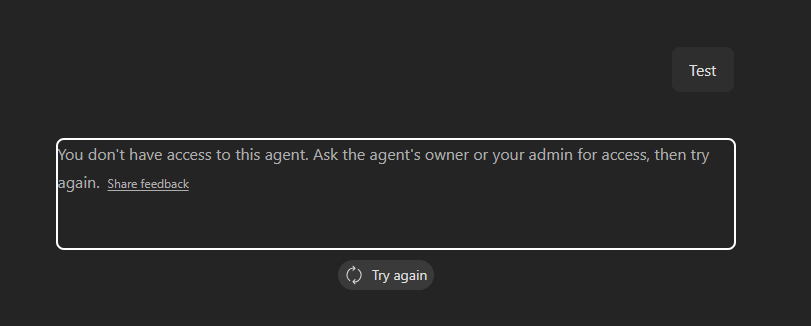
“You don’t have access to this agent. Ask the agent’s owner or your admin for access, then try again.”
This is an important result, because it means blocking is a containment measure you can really rely on: it lets you quickly disable a non-compliant agent without having to delete it permanently, leaving you free to analyse it calmly, contact the owner, and decide later whether to re-enable it or remove it.
A draft agent that has never been published can only be deleted
The third point concerns agents that stay in draft and are never published. Here the situation is more delicate: an agent in this state cannot be managed centrally, neither through the Power Platform Admin Center nor through Agent 365. The only available action is deleting it outright.
This means that if a user creates an agent, leaves it in draft and never publishes it, the only way to act on it is to delete it, without the intermediate option of blocking or temporarily suspending it as you can with published agents.
A problem I have already seen escalate on large tenants
I do not want to dwell on any single case, but I can say with confidence, from direct experience across several enterprise tenants, that when Copilot Studio is available and not governed in any way, things tend to get complicated quickly as the tenant grows.
The more users have access to Copilot Studio, the more agents get created on their own initiative, in personal or shared environments, often without any real approval process behind them. With the introduction of the new GitHub Copilot-based mode, this phenomenon (already hard to keep under control in large tenants) is compounded by a consumption model that, as we have seen, can kick in even for simple personal, unshared use.
The result is that the surface to monitor gets wider, while the available control tools remain, as of today, partial.
The smartest solution: do not chase agents, govern capacity
After thinking at length about inventory scripts, alerts and manual review processes, I reached a different conclusion from the one I started with: chasing agents one by one is the least efficient strategy possible. Every enumeration script, every notification, every approval process always steps in after the consumption has already happened.
The smartest solution, in my view, is not technical in the sense of “write an automation that deletes the wrong agents”. It sits much further upstream, and it is a governance matter: deciding who can use Copilot Studio and, above all, how much financial capacity is actually available to those who use it outside a controlled perimeter.
Allocate Copilot Credits per environment, not at tenant level
In the Power Platform Admin Center, under Licensing > Copilot Studio > Manage Copilot Credits, an administrator can allocate Copilot Credits environment by environment, instead of just leaving them in a shared tenant-level pool. This applies both to prepaid capacity and to Pay-As-You-Go plans, which can be associated with a billing plan linked to specific environments.
For each environment you can set a precise number of allocated credits and, above all, configure what happens when that threshold is reached, through the Draw from the available capacity in my tenant option:
- if enabled, the environment first uses up its own allocation and then keeps drawing on the tenant’s remaining unallocated capacity;
- if disabled, the environment is restricted to its own allocation only and, once that is exhausted, cannot consume any further.
This second behaviour is exactly the lever I was looking for: if I create a dedicated environment, for example an authorised “Sandbox Copilot Studio”, and allocate there the capacity I actually want to make available, I can then set every other environment, including the Default Environment, to a zero allocation with draw from the tenant disabled. The practical result is that an agent created outside the authorised perimeter simply has no credits to consume, and therefore does not work, without anyone having to step in manually to block it.
It is the same principle we have used for years to manage storage quotas or Azure subscriptions: you do not chase whoever goes over the limit, you decide upfront how much that perimeter can actually spend.
Also govern who can access Copilot Studio
Capacity allocation is the financial side of the argument, but it needs to be paired with a second layer of control: who can actually create agents. If only a small group of authorised makers has access to Copilot Studio, through environment security roles, dedicated security groups or, more simply, by restricting who has access to the environments with assigned capacity, the problem shrinks further, because the number of people who can even attempt to create an agent with the new mode drops drastically.
Combining the two layers, the overall logic becomes:
Ambiente "Copilot Studio Sandbox"
  → Maker autorizzati: gruppo ristretto
  → Copilot Credits allocati: quantità definita e monitorata
  → Draw from tenant capacity: abilitato solo se necessario

Tutti gli altri ambienti (incluso il Default Environment)
  → Copilot Credits allocati: 0
  → Draw from tenant capacity: disabilitato
  → Risultato: nuovi agenti creati fuori dal perimetro non hanno crediti da consumare
The point is not to technically prevent the agent from being created. The interface will keep offering it, as we have seen; the point is to make that agent financially inert if it is created outside the authorised perimeter. A maker can still create an agent in the Default Environment, but if that environment has no allocated credits and cannot draw on the tenant pool, the agent simply will not be usable.
What is still worth doing
Even with this strategy as the primary measure, I would not drop the other precautions discussed so far altogether. I would still:
- periodically monitor consumption per environment, which the Power Platform Admin Center already provides with daily history for up to three months and monthly history for up to twelve, to check that the chosen allocation matches real usage;
- use blocking for already-published agents that, despite everything, turn out to be unauthorised or problematic, given that I have verified it works correctly;
- explain to users why this perimeter exists, so that the restriction is not perceived as an unjustified block on innovation rather than as a cost-control measure.
The key difference is that these become second-level controls, for verification and fine-tuning, while the real barrier against financial risk sits upstream, in capacity allocation.
In summary
The new Copilot Studio experience is an important step forward in terms of usability. Creating agents has become simpler and more accessible, whatever the technical seniority of the person doing it. Precisely for this reason, though, the change in consumption model that comes with it risks going unnoticed, and it is more insidious than it looks at first sight.
We are not just talking about a pool of prepaid credits being consumed faster than expected: in tenants configured for consumption billing, the risk translates into real and immediate spend. Nor are we just talking about uncontrolled sharing: as I verified directly, even personal, never-shared use of an agent created with this mode consumes tenant credits, dismantling the widespread idea that “if it is just for me, my licence takes care of it”.
There are two pieces of good news: blocking an agent really works, and you can track precisely where consumption comes from, channel by channel. But the most important news is that you do not need to chase every single agent to govern this risk: by allocating Copilot Credits per environment and restricting the financial capacity available outside a controlled perimeter, the problem is tackled upstream, structurally, instead of chasing the symptoms one at a time.
My closing advice is the same thought I started writing this article with: check how many agents have already been created through the new experience in your tenants, find out whether your billing model is based on prepaid credits or Pay-As-You-Go, and consider whether it is time to redesign capacity allocation per environment, rather than just chasing every new agent that appears.
Microsoft references
- Overview of usage-based billing for agents and workflows powered by GitHub Copilot
- Overview of the new agent creation experience
- Manage Copilot Credits and capacity for Copilot Studio
- Tutorial: Manage Copilot Credits allocations programmatically
- Delete agents programmatically via the Power Platform API
- REST API reference for deleting an agent