Open-source project · v1.0.0
ARGUS
The governance debt of your Microsoft 365 tenant, made visible.
A free PowerShell module that runs 73 read-only checks, computes a Governance Score and produces an HTML report that explains every finding and how to fix it.
Install-Module ARGUS - 73 checks
- 7 areas
- Read-only
- PowerShell 7.2+
- Windows · macOS · Linux
- MIT licence
Nobody checks the tenant’s hygiene.
In Microsoft 365 tenant assessments I keep finding the same things: guests invited for projects that closed long ago, Teams without owners, licences paid for on disabled accounts, secrets expiring without anyone noticing. None of them is a security incident. Together they are governance debt: costs, access and data that nobody governs any more.
The tools I knew check security posture; operational hygiene needed scattered scripts and a lot of manual work. Copilot made it urgent: Copilot answers from everything a user can access, so forgotten oversharing ends up in its answers. ARGUS puts those checks into one repeatable command, with a report you can hand over.
-
Guests nobody remembers
Invited for a project that ended years ago, still with access to Teams, sites and files.
ARG.ENT.004ARG.ENT.005ARG.ENT.006 -
Teams and groups without owners
Nobody approves access, nobody gets the expiry notices, nobody decides what to keep.
ARG.GRP.004ARG.GRP.005ARG.GRP.006 -
Licences paid for and never used
On disabled accounts, inactive for months or assigned twice: recurring cost with no value.
ARG.LIC.001ARG.LIC.002ARG.LIC.006 -
Secrets that expire silently
App credentials with no owner or rotation: the integration stops and users find out first.
ARG.APP.001ARG.APP.002ARG.APP.005 -
Inactive sites and links for anyone
Content nobody curates, shared more widely than needed and then forgotten.
ARG.SPO.002ARG.SPO.006ARG.SPO.009 -
Copilot and agents without rules
Self-service purchases, unused Copilot licences, agents built by anyone and shared with everyone.
ARG.COP.001ARG.COP.003ARG.COP.009
What it is
- A governance and hygiene assessment across 7 areas: Entra ID, app registrations, licensing, groups and Teams, SharePoint and OneDrive, Exchange Online, Copilot and agents.
- Strictly read-only: it never writes, changes or deletes anything in the tenant.
- Lightweight: Microsoft.Graph.Authentication is enough. When an optional module is missing, the checks that need it are Skipped with the reason, never errors.
- One HTML file with no external dependencies, in light and dark mode, printable as PDF.
What it is not
- Not a security baseline: no CIS, CISA, MFA, Conditional Access or Defender checks. Dedicated tools such as Maester cover those.
- Not a remediation tool: it tells you what to change; you decide and apply it. The sample code in the report is never executed.
One command, one report.
- 01
Connect
Connect-ArgusInteractive sign-in or app-only with a certificate. Microsoft Graph is enough to start; Exchange Online and SharePoint are added when needed.
- 02
Run
Invoke-Argus73 read-only checks, in one or two minutes on a tenant with a few hundred users.
- 03
Read the report
HTML · JSON · CSVGovernance Score, results by area and, for every check, what was found, why it matters and how to fix it.
The report, live on this page.
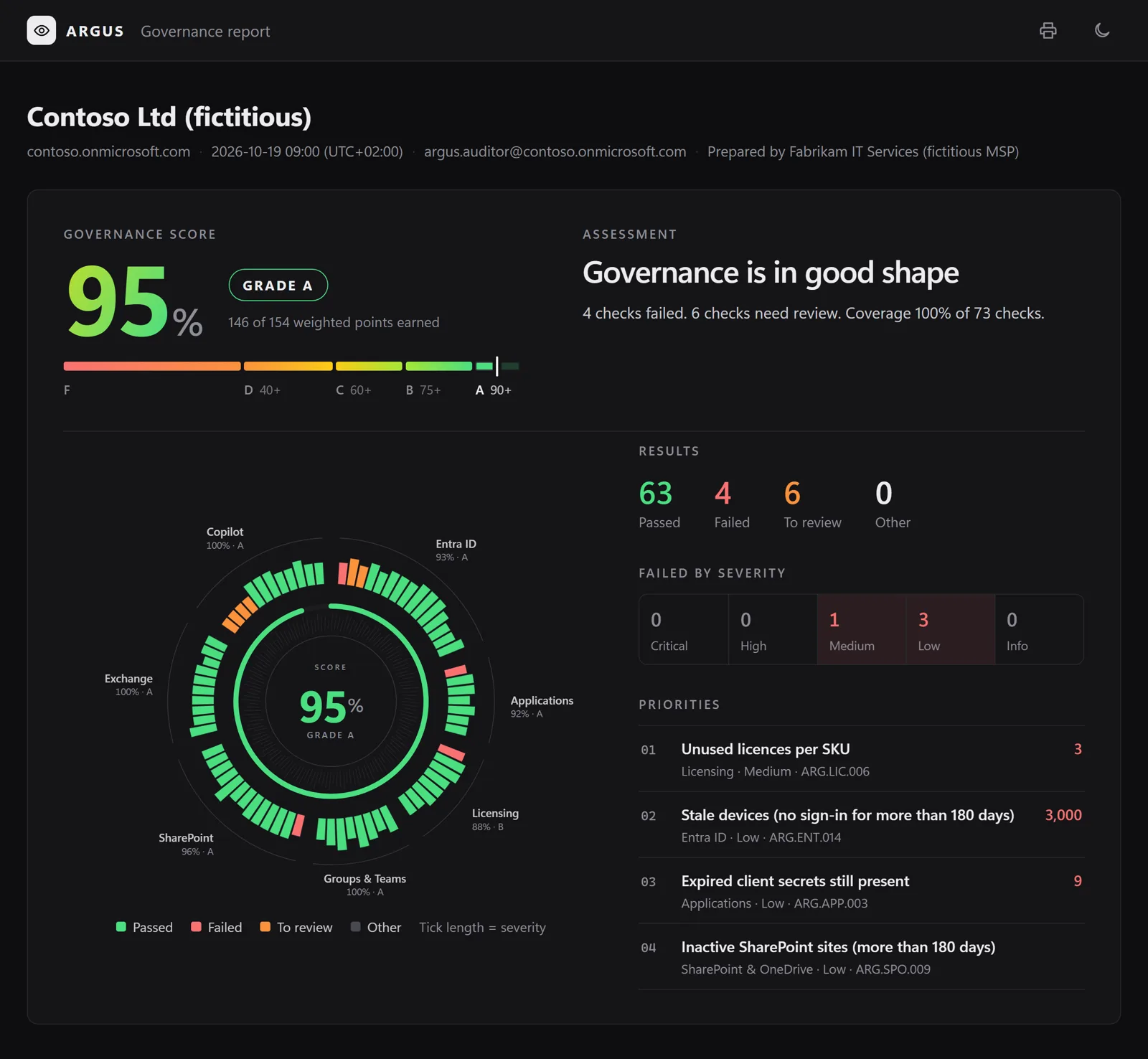
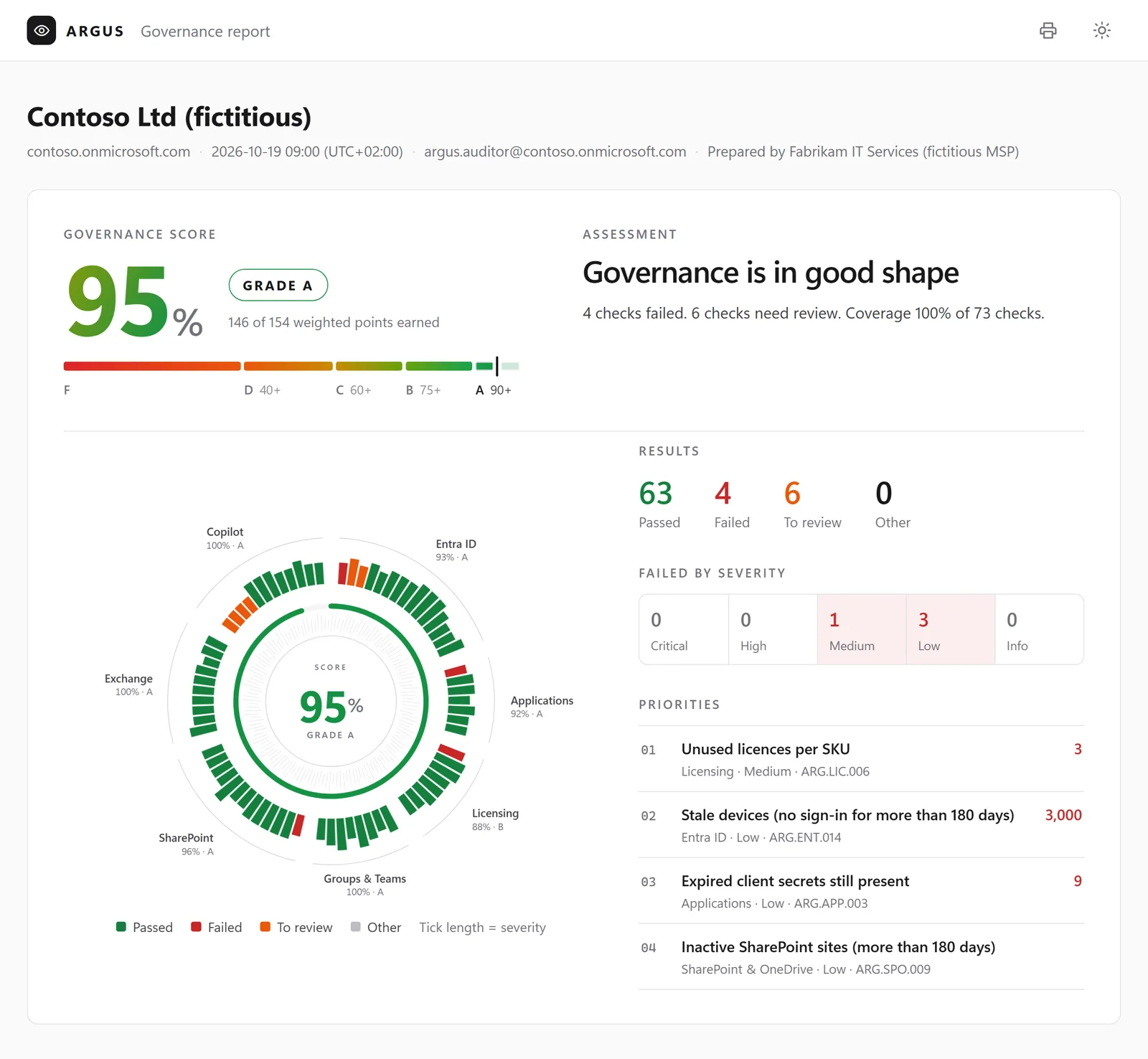
It is a real report, generated by ARGUS on a fictitious tenant. Filter, search, open the checks and their findings: it works just like on your PC.
One number, explained.
Each check weighs according to its severity. The score says how much of the evaluated weight is in order, for the whole tenant and for each area.
Weight by severity
- Critical10
- High5
- Medium3
- Low1
- Info0
Credit by result
- Passed100%
- To review50%
- Failed0
- Skippedleft out
Score = 100 × Σ(weight × credit) / Σ(evaluated weight)
- A≥ 90
- B≥ 75
- C≥ 60
- D≥ 40
- F< 40
When less than 70% of the selected weight can be evaluated (missing licences or permissions), the score is labelled as partial.
73 checks, one by one.
What each check looks at and why it matters. Permissions, parameters and remediation code are in the documentation on GitHub.
73 checks
-
ARG.ENT.001 Enabled members inactive for more than 90 days Entra ID Medium
What is checked
Enabled member accounts whose last successful sign-in (interactive or non-interactive) is older than 90 days, including accounts that never signed in and were created more than 90 days ago. Uses
signInActivity.lastSuccessfulSignInDateTime, falling back to the last sign-in attempt for activity before December 2023.Technical details and remediation on GitHubWhy it matters
Accounts nobody uses keep their group memberships, app access and licences. Reviewing them regularly is the basis of identity lifecycle governance.
-
ARG.ENT.002 Licensed users without manager or department Entra ID Low
What is checked
Enabled member users with at least one licence whose
managerordepartmentis empty in Microsoft Entra ID (GET /users?$expand=manager). Accounts without licences (service, shared and emergency accounts) are not evaluated; use the global exclusions for licensed accounts that are not people.Technical details and remediation on GitHubWhy it matters
Manager and department drive access reviews, approval workflows, dynamic groups, the organisation chart and the people Copilot considers relevant. Missing values usually mean the HR provisioning or the joiner process skipped a step, and they make every later governance step manual.
-
ARG.ENT.003 Guest invitations are restricted Entra ID Medium
What is checked
Reads who can invite guests (
authorizationPolicy.allowInvitesFrom): none or adminsAndGuestInviters pass; adminsGuestInvitersAndAllMembers (all members can invite) needs review; everyone (guests can invite other guests too) fails.Technical details and remediation on GitHubWhy it matters
Who can bring external people into the tenant is a governance decision. Letting guests invite other guests removes the organisation from that decision.
-
ARG.ENT.004 Guests that never accepted the invitation (more than 30 days) Entra ID Medium
What is checked
Guest accounts whose
externalUserStateis still PendingAcceptance more than 30 days after they were invited (externalUserStateChangeDateTime, orcreatedDateTimewhen not set).Technical details and remediation on GitHubWhy it matters
Unredeemed invitations clutter the directory, are often typos or abandoned collaborations, and can be redeemed later by whoever controls the mailbox.
-
ARG.ENT.005 Guests inactive for more than 90 days Entra ID Medium
What is checked
Enabled guest accounts that accepted their invitation but have not signed in for 90 days, including guests that never signed in and were added more than 90 days ago. Guests still pending acceptance are covered by ARG.ENT.004.
Technical details and remediation on GitHubWhy it matters
Guests keep access to Teams, sites and files after the collaboration has ended. Removing inactive guests limits what external people can still reach.
-
ARG.ENT.006 Guests without a sponsor Entra ID Medium
What is checked
Enabled guest users with no sponsor (
GET /users?$expand=sponsors). Sponsors are the users or groups responsible for the guest's access and information; Microsoft Entra sets the inviter as sponsor for new invitations, so guests without one were usually invited before sponsors existed, lost a sponsor that left, or were invited by sharing a SharePoint file (a known case where no sponsor is set). Skipped when the account cannot read sponsors.Technical details and remediation on GitHubWhy it matters
Without a sponsor nobody is accountable for the guest: access reviews have no reviewer, and the guest stays after the collaboration ends. A sponsor (a person or, better, a group) makes guest lifecycle decisions possible.
-
ARG.ENT.007 At least 2 emergency access (break-glass) accounts Entra ID High
What is checked
Looks for emergency access accounts: the accounts listed in the Accounts parameter (UPNs or object ids) or, when the list is empty, users whose UPN or display name matches NamePatterns. An account is compliant when it follows the configuration requirements Microsoft documents: enabled, member, cloud-only (not synchronised), UPN on a
*.onmicrosoft.comdomain, and an active Global Administrator assignment made directly to the account (not only eligible in PIM, not through a group). Fails when fewer than 2 compliant accounts exist. Authentication methods, Conditional Access exclusions and sign-in alerting are part of the same guidance but are security controls outside the scope of ARGUS: verify them separately. Global exclusions are not applied.Technical details and remediation on GitHubWhy it matters
Emergency access accounts prevent the organisation from being locked out of its tenant when federation, MFA or the usual administrators are unavailable. Microsoft recommends two or more, cloud-only, with a permanent active Global Administrator assignment.
-
ARG.ENT.008 Global Administrator count outside 2 to 4 Entra ID High
What is checked
Counts the distinct holders of the Global Administrator role: active assignments and, with Entra ID P2, eligible (PIM) assignments. Members of role-assignable groups that hold the role are counted individually. Fails when the count is below 2 or above 4. Global exclusions are not applied: emergency-access accounts must be counted.
Technical details and remediation on GitHubWhy it matters
Too few Global Administrators risks losing control of the tenant; too many makes the most powerful role hard to govern. Keep two emergency-access accounts plus a small number of named administrators, and delegate the rest to least-privileged roles.
-
ARG.ENT.009 Directory roles assigned to guests Entra ID High
What is checked
Any Microsoft Entra directory role (active, or eligible with Entra ID P2) held by a guest account, directly or through a role-assignable group.
Technical details and remediation on GitHubWhy it matters
Administrative roles should be held by accounts the organisation controls. A guest account follows the lifecycle of another tenant: when the person leaves their company, nobody here is notified.
-
ARG.ENT.010 Users can register applications Entra ID Medium
What is checked
Reads
authorizationPolicy.defaultUserRolePermissions.allowedToCreateApps("Users can register applications" in User settings). Fails when every user can create app registrations.Technical details and remediation on GitHubWhy it matters
App registrations created by anyone end up without an owner, a purpose or a credential policy. Restricting creation to the Application Developer role keeps the application estate governable.
-
ARG.ENT.011 Users can create tenants Entra ID Low
What is checked
Reads
authorizationPolicy.defaultUserRolePermissions.allowedToCreateTenants("Restrict non-admin users from creating tenants" in User settings). Fails when non-admin users can create Microsoft Entra tenants.Technical details and remediation on GitHubWhy it matters
A tenant created by a user becomes a separate directory where that user is Global Administrator, outside the organisation's governance and visibility.
-
ARG.ENT.012 LinkedIn account connections disabled Entra ID Low
What is checked
The LinkedIn account connections setting (Microsoft Entra admin center > Users > User settings) lets users connect their work account to LinkedIn in Microsoft apps. It is enabled by default, except for organisations provisioned in Germany or France. Microsoft Graph has no documented API to read this setting, so ARGUS cannot evaluate it: the result is always Investigate and the setting must be checked manually. Expected value: No (or Selected group, if a business need was approved).
Technical details and remediation on GitHubWhy it matters
Once a user consents, Microsoft apps exchange profile and connection data between the work account and LinkedIn. Whether to allow it is an organisation decision about data sharing with a third-party service, and it should be explicit rather than left at the default.
-
ARG.ENT.013 Security groups without owners Entra ID Low
What is checked
Cloud security groups with assigned membership and no owner. Dynamic groups, role-assignable groups, mail-enabled security groups (managed in Exchange) and groups synchronised from on-premises Active Directory are not evaluated.
Technical details and remediation on GitHubWhy it matters
Without an owner, nobody is accountable for who is in the group and what the group grants access to.
-
ARG.ENT.014 Stale devices (no sign-in for more than 180 days) Entra ID Low
What is checked
Devices whose
approximateLastSignInDateTimeis older than 180 days (or that never signed in and were registered more than 180 days ago). Both enabled and disabled devices are listed; disabled ones are usually ready to be deleted.Technical details and remediation on GitHubWhy it matters
Stale devices make device inventories, Conditional Access reporting and licence counts unreliable.
-
ARG.ENT.015 Directory synchronisation is up to date Entra ID Medium
What is checked
For hybrid tenants (
organization.onPremisesSyncEnabled= true), fails when the last directory synchronisation (onPremisesLastSyncDateTime) is older than 24 hours. Cloud-only tenants are skipped.Technical details and remediation on GitHubWhy it matters
When synchronisation stops, changes made on-premises (leavers disabled, group changes) no longer reach Microsoft 365, and governance decisions are based on stale data.
-
ARG.APP.001 App registrations without owners Applications Medium
What is checked
App registrations with no owner. The findings show how many secrets and certificates each app holds: an ownerless app with credentials is the first to review.
Technical details and remediation on GitHubWhy it matters
Without an owner nobody is accountable for the app's permissions, credentials and lifecycle, and nobody notices when it is no longer needed.
-
ARG.APP.002 Client secrets expiring within 30 days Applications Medium
What is checked
Client secrets (
passwordCredentials) of app registrations that expire within the next 30 days. A secret counts as replaced when the same app already has another secret valid beyond that window; the check fails only for secrets without a replacement.Technical details and remediation on GitHubWhy it matters
An expired secret stops the integration that uses it. Planned rotation, owned by someone, avoids outages discovered by users.
-
ARG.APP.003 Expired client secrets still present Applications Low
What is checked
Client secrets (
passwordCredentials) whoseendDateTimeis in the past but that are still attached to the app registration.Technical details and remediation on GitHubWhy it matters
Expired secrets are clutter that hides which credentials are really in use and makes credential reviews harder.
-
ARG.APP.004 Client secrets with a lifetime above 24 months Applications Low
What is checked
Valid client secrets whose lifetime (
endDateTimeminusstartDateTime) exceeds 24 months. The admin center limits new secrets to 24 months, but secrets created through the API or before that limit can last much longer. Expired secrets are covered by ARG.APP.003.Technical details and remediation on GitHubWhy it matters
Long-lived secrets are rarely rotated and outlive the people and documentation that explain them. Microsoft recommends less than 12 months, or certificates and managed identities instead.
-
ARG.APP.005 Certificates expiring within 30 days Applications Medium
What is checked
Certificates (
keyCredentialswith usage Verify, used by the app to authenticate) that expire within the next 30 days. A certificate counts as replaced when the same app already has another certificate valid beyond that window; the check fails only for certificates without a replacement.Technical details and remediation on GitHubWhy it matters
An expired certificate stops app-only integrations (automation, connectors, scripts). Planned renewal avoids outages.
-
ARG.APP.006 Expired certificates still present Applications Low
What is checked
Certificates (
keyCredentials, any usage) whoseendDateTimeis in the past but that are still attached to the app registration.Technical details and remediation on GitHubWhy it matters
Expired certificates are clutter that hides which credentials are really in use and makes credential reviews harder.
-
ARG.APP.007 Certificates with a lifetime above 180 days Applications Low
What is checked
Valid authentication certificates (
keyCredentialswith usage Verify) whose lifetime (endDateTimeminusstartDateTime) exceeds 180 days. Expired certificates are covered by ARG.APP.006.Technical details and remediation on GitHubWhy it matters
Microsoft recommends limiting application certificate lifetime to 180 days and automating renewal. Long-lived certificates are rarely rotated and stay valid long after the people who deployed them have moved on.
-
ARG.LIC.001 Disabled users that still have licences Licensing High
What is checked
Disabled accounts (
accountEnabled= false) with at least one licence. Shared, room and equipment mailboxes are excluded using Exchange Online (they are disabled by design and may legitimately need a licence). When Exchange Online is not connected they cannot be told apart, so the result is Investigate.Technical details and remediation on GitHubWhy it matters
A licence on a disabled account is paid for but cannot be used. Leavers are the most common cause.
-
ARG.LIC.002 Enabled licensed users inactive for more than 90 days Licensing High
What is checked
Enabled member accounts with at least one licence that have not signed in for 90 days (same inactivity logic as ARG.ENT.001: last successful sign-in, accounts that never signed in count from their creation date). The findings list the licences assigned to each account.
Technical details and remediation on GitHubWhy it matters
Licences assigned to people who no longer use them are recurring cost with no business value, and the accounts keep access nobody reviews.
-
ARG.LIC.003 Paid licences assigned to guest users Licensing Medium
What is checked
Guest users (
userType= Guest) with at least one paid licence. Free, viral and trial SKUs are ignored (IgnoredSkus, trial subscriptions from/directory/subscriptions), as in ARG.LIC.006. Guests normally work with the licences of their home organisation or with the B2B allowance; a paid seat on a guest is usually a mistake or a leftover.Technical details and remediation on GitHubWhy it matters
Licences assigned to guests cost a full seat, are rarely reviewed and often stay after the collaboration ends. When a guest really needs a licence, it should be a documented decision with a sponsor, not the side effect of a group-based assignment.
-
ARG.LIC.004 Users with overlapping licences Licensing Medium
What is checked
Users with two paid SKUs where every service plan of one SKU is also in the other (from
subscribedSkus.servicePlans), typically a standalone product or an older suite next to the suite that includes it. The contained SKU is redundant. The comparison uses service plan IDs, so it needs no list of SKU names; free, viral and trial SKUs are ignored as in ARG.LIC.006.Technical details and remediation on GitHubWhy it matters
Overlapping licences usually come from upgrades where the old SKU was never removed, or from two licensing groups that both include the user. The contained seat is paid twice and blocks a seat that could go to someone else.
-
ARG.LIC.005 Licence assignment errors Licensing Medium
What is checked
Users whose
licenseAssignmentStatescontain an entry in state Error (the licence is not assigned) or ActiveWithError (assigned, but part of it failed). The error column shows the reason reported by Microsoft Entra ID, for example CountViolation (not enough seats), MutuallyExclusiveViolation or ProhibitedInUsageLocationViolation. Group names are shown when groups could be read.Technical details and remediation on GitHubWhy it matters
Assignment errors leave users without the services they are expected to have, and usually go unnoticed when licences are assigned through groups.
-
ARG.LIC.006 Unused licences per SKU Licensing Medium
What is checked
Compares purchased seats (
prepaidUnits.enabled) with assigned seats (consumedUnits) for every active, user-assignable SKU (capabilityStatus= Enabled,appliesTo= User). A SKU fails when more than 10% or more than 5 seats are unused. Free, viral and developer SKUs (the IgnoredSkus list), SKUs with 10,000 or more seats (free offers are provisioned with very large quantities) and trial SKUs (isTrialin/directory/subscriptions) are ignored.Technical details and remediation on GitHubWhy it matters
Unused seats are a recurring cost with no business value. Reviewing them before each renewal is the simplest licence saving.
-
ARG.LIC.007 Shared mailboxes with a licence Licensing Low
What is checked
Shared mailboxes (Exchange Online) whose user object has licences assigned. A shared mailbox needs a licence only when it is larger than 50 GB, has an online archive, or is on litigation hold or an in-place hold. Mailboxes that meet one of these conditions (size of 50 GB or more, archive active,
LitigationHoldEnabled, non-emptyInPlaceHolds) are not listed; the others are returned for review (Investigate), because organisation-wide retention policies and other needs are not visible to this check.Technical details and remediation on GitHubWhy it matters
Shared mailboxes are often licensed when a user mailbox is converted and the licence is never removed: a recurring cost with no benefit.
-
ARG.LIC.008 Paid licences assigned directly to users Licensing Low
What is checked
Users with at least one paid licence assigned directly (
licenseAssignmentStatesentry withoutassignedByGroup) instead of through group-based licensing. Free, viral and developer SKUs (the IgnoredSkus list), SKUs with 10,000 or more seats and trial SKUs (isTrialin/directory/subscriptions) are not counted: they are usually self-service sign-ups. AlsoFromGroup lists the direct licences the user also receives from a group, where the direct assignment is redundant.Technical details and remediation on GitHubWhy it matters
Direct assignments are not driven by group membership: they are not removed when a person changes role or leaves, and they are hard to audit at scale. Group-based licensing keeps paid licences consistent with joiner/mover/leaver processes.
-
ARG.GRP.001 Microsoft 365 group creation is restricted Groups & Teams Medium
What is checked
Reads
EnableGroupCreationandGroupCreationAllowedGroupIdin the tenant-wide Group.Unified directory setting. When the setting was never created every user can create Microsoft 365 groups and Teams (default). Unrestricted creation is Investigate: it is a valid choice for some organisations, provided ownership and expiration are governed.Technical details and remediation on GitHubWhy it matters
Every new Team or Planner plan creates a Microsoft 365 group with a mailbox and a SharePoint site. Without a creation policy, sprawl and duplicates grow quickly; restricting creation to trained users or adding a request process keeps it governed.
-
ARG.GRP.002 Group naming policy configured Groups & Teams Low
What is checked
Reads
PrefixSuffixNamingRequirementandCustomBlockedWordsListin the tenant-wide Group.Unified directory setting. Passes when a prefix/suffix rule or a blocked-words list is configured. The naming policy requires Microsoft Entra ID P1 for the users it applies to.Technical details and remediation on GitHubWhy it matters
A naming convention (for example a GRP- prefix or a department attribute) makes groups and Teams easy to recognise in the address book, in Teams and in SharePoint; blocked words prevent misleading names.
-
ARG.GRP.003 Group expiration policy configured Groups & Teams Medium
What is checked
Reads
groupLifecyclePolicies. Fails when no expiration policy exists or when it applies to no group (managedGroupTypes= None); a policy that applies only to selected groups is Investigate. Groups with recent activity are renewed automatically, so active owners are not disturbed.Technical details and remediation on GitHubWhy it matters
Without an expiration policy, Microsoft 365 groups and Teams that are no longer used stay forever with their content, guests and permissions. Expiration asks owners to confirm that the group is still needed.
-
ARG.GRP.004 Microsoft 365 groups and Teams without owners Groups & Teams High
What is checked
Microsoft 365 (Unified) groups, including the ones connected to Teams, with no owner.
Technical details and remediation on GitHubWhy it matters
Nobody manages membership, guests or content of an ownerless group, nobody receives its expiration notices, and nobody can approve access requests. Microsoft recommends at least two owners per group.
-
ARG.GRP.005 Microsoft 365 groups and Teams with a single owner Groups & Teams Low
What is checked
Microsoft 365 (Unified) groups, including Teams, with exactly one owner. The Owner column shows who it is and OwnerEnabled whether that account is still enabled; groups whose only owner is disabled are listed first.
Technical details and remediation on GitHubWhy it matters
A single owner is a single point of failure: when that person leaves or changes role the group becomes ownerless. Microsoft recommends at least two owners.
-
ARG.GRP.006 Teams with guests and no owner Groups & Teams High
What is checked
Teams (Microsoft 365 groups with a team) that have no owner and at least one guest member. Members of the ownerless Teams are read with JSON batching (
GET /groups/<id>/members/microsoft.graph.user, first 999 members).Technical details and remediation on GitHubWhy it matters
Guests in a team without owners keep access to its chats, files and site, and nobody reviews or removes them. These Teams are the first to fix among ownerless groups (ARG.GRP.004).
-
ARG.GRP.007 Public Microsoft 365 groups Groups & Teams Medium
What is checked
Microsoft 365 (Unified) groups with
visibility= Public. Anyone in the organisation can join a public group, or its team, and read its conversations, files and site without approval. The Team column shows whether a team is connected.Technical details and remediation on GitHubWhy it matters
Public groups are fine for organisation-wide communities, but projects, departments and customer work usually hold content that should be limited to members. Reviewing them keeps visibility a deliberate choice.
-
ARG.GRP.008 Inactive Teams (more than 180 days) Groups & Teams Low
What is checked
Teams whose
Last Activity Datein the Teams team activity report (getTeamsTeamActivityDetail, period D180) is older than 180 days, or empty (no activity recorded in the report period). Teams created less than 180 days ago and teams that no longer exist are ignored when groups can be read. With concealed report names, or when the report returns no rows, the result is Investigate.Technical details and remediation on GitHubWhy it matters
Inactive Teams keep content, guests and permissions that nobody curates. Archiving or deleting them keeps search, storage and access reviews meaningful.
-
ARG.SPO.001 SharePoint site creation is restricted SharePoint & OneDrive Medium
What is checked
Reads
admin/sharepoint/settings.isSiteCreationEnabled("Users can create SharePoint sites" in the SharePoint admin center) andisSiteCreationUIEnabled. When users can create sites, communication sites and team sites without a group can be created by anyone, even if Microsoft 365 group creation is restricted (ARG.GRP.001): Investigate, as it is a valid choice for some organisations.Technical details and remediation on GitHubWhy it matters
Self-service sites multiply quickly, often without a clear owner, classification or lifecycle. Restricting creation, or routing it through a request process with a template, keeps the site estate governable and the Copilot index clean.
-
ARG.SPO.002 Tenant external sharing level SharePoint & OneDrive Medium
What is checked
Reads the organisation-level sharing setting for SharePoint and OneDrive (
admin/sharepoint/settings.sharingCapability). Anyone (externalUserAndGuestSharing: links that do not require sign-in) is reported as Investigate; New and existing guests, Existing guests only and Only people in your organisation pass. The findings also show the domain restriction mode and whether guests can reshare. Individual sites can only be more restrictive than this setting.Technical details and remediation on GitHubWhy it matters
Anyone links can be forwarded to people outside the organisation without any record of who opened them. Many organisations allow them on purpose for a few sites; the tenant-wide level should be a conscious decision with site-level restrictions where needed.
-
ARG.SPO.003 Default sharing link is limited to specific people SharePoint & OneDrive Medium
What is checked
Reads the default link type of the sharing dialog with PnP.PowerShell (
Get-PnPTenant):CoreDefaultShareLinkScopefor SharePoint andOneDriveDefaultShareLinkScopefor OneDrive, falling back toDefaultSharingLinkTypewhen they are Uninitialized. Anyone as default fails; People in your organisation (or the widest allowed link) is Investigate; Specific people passes. NeedsConnect-Argus -Service SharePoint; otherwise the check is Skipped.Technical details and remediation on GitHubWhy it matters
Most people accept the default link. A default of Anyone or of the whole organisation turns every quick share into broad access, which is the main source of oversharing that Copilot later surfaces in answers. Specific people as default keeps sharing intentional.
-
ARG.SPO.004 Anyone links expire within 30 days SharePoint & OneDrive Medium
What is checked
When the organisation allows Anyone links (
sharingCapability= externalUserAndGuestSharing), readsRequireAnonymousLinksExpireInDayswith PnP.PowerShell (Get-PnPTenant). Fails when Anyone links never expire (0 or not set) or expire after more than 30 days. Passes without evaluation when Anyone links are not allowed. NeedsConnect-Argus -Service SharePoint; otherwise the check is Skipped.Technical details and remediation on GitHubWhy it matters
An Anyone link works for whoever has it, for as long as it exists. An expiration limit bounds how long a forwarded or leaked link stays usable, without forbidding Anyone links where the business needs them.
-
ARG.SPO.005 Guest access to sites and files expires SharePoint & OneDrive Medium
What is checked
Reads
ExternalUserExpirationRequiredandExternalUserExpireInDayswith PnP.PowerShell (Get-PnPTenant): whether guests lose access to sites and files after a number of days unless a site owner renews it. Fails when the policy is off. Passes without evaluation when external sharing is disabled (sharingCapability= disabled). NeedsConnect-Argus -Service SharePoint; otherwise the check is Skipped.Technical details and remediation on GitHubWhy it matters
Guests invited for a project keep access long after it ends. An expiration policy makes site owners confirm, periodically, who still needs access; it complements guest reviews in Entra ID (ARG.ENT.005).
-
ARG.SPO.006 Sites that allow Anyone links SharePoint & OneDrive Low
What is checked
Site collections (PnP.PowerShell
Get-PnPTenantSite, OneDrive excluded) whose own sharing setting isExternalUserAndGuestSharing(Anyone). Listed as Investigate: Anyone links may be intended on some sites, but each one should be known. Passes without evaluation when the organisation does not allow Anyone links. NeedsConnect-Argus -Service SharePoint; otherwise the check is Skipped.Technical details and remediation on GitHubWhy it matters
The organisation level sets the maximum; each site inherits it unless an administrator restricts it. Knowing which sites can create Anyone links lets you keep that capability only where it has a business owner and a reason.
-
ARG.SPO.007 Sites without a sensitivity label SharePoint & OneDrive Low
What is checked
Site collections (PnP.PowerShell
Get-PnPTenantSite, OneDrive and system sites excluded) without a sensitivity label (SensitivityLabelempty). When no site has a label at all, sensitivity labels are probably not used for sites and groups: the result is To review instead of Failed. NeedsConnect-Argus -Service SharePoint; otherwise the check is Skipped.Technical details and remediation on GitHubWhy it matters
A container label sets the privacy, external sharing and guest access of a site in one place and tells users and Copilot how sensitive its content is. Once labels are in use, unlabelled sites are the ones that escape those controls and the classification.
-
ARG.SPO.008 Orphaned SharePoint sites SharePoint & OneDrive High
What is checked
Group-connected sites whose Microsoft 365 group has no owner (site URL read with JSON batching,
GET /groups/<id>/sites/root). When SharePoint is connected through PnP.PowerShell, sites without a Microsoft 365 group (classic team sites, communication sites) are also evaluated: a site is orphaned when its primary site collection administrator (OwnerinGet-PnPTenantSite) is empty, disabled or no longer exists. Without PnP those sites are not evaluated and the summary says so.Technical details and remediation on GitHubWhy it matters
Nobody manages permissions, sharing or content of a site without a responsible owner, and access requests go unanswered. Orphaned sites are also the hardest to clean up later.
-
ARG.SPO.009 Inactive SharePoint sites (more than 180 days) SharePoint & OneDrive Low
What is checked
SharePoint sites whose
Last Activity Datein the site usage report (getSharePointSiteUsageDetail, period D180) is older than 180 days or empty (no activity in the report period). Deleted sites and system sites (ExcludedTemplates: search center, compliance policy center, tenant fundamental site, app catalog) are ignored; OneDrive accounts are not part of this report. When the report leavesSite URLempty (a known issue of the usage reports), the URL is read from theSite Id: first from the PnP tenant site list when SharePoint is connected (it includes private group and channel sites), then withGET /sites/<id>, which in delegated mode only reads the sites the account can access; the owner falls back toOwner Display Nameand is "Not reported" when the report has none. With concealed report names, or when the report returns no rows, the result is Investigate.Technical details and remediation on GitHubWhy it matters
Inactive sites hold content and permissions that nobody curates, use storage and appear in search. Reviewing them regularly keeps the information architecture clean.
-
ARG.SPO.010 Sites near their storage quota (more than 90%) SharePoint & OneDrive Low
What is checked
SharePoint sites whose used storage is more than 90% of the allocated storage, from the site usage report (
Storage Used (Byte)/Storage Allocated (Byte), period D180). Deleted sites and sites without an allocation are ignored. With concealed report names, or when the report returns no rows, the result is Investigate. When the report leavesSite URLempty (a known issue of the usage reports), the URL is read from theSite Id: first from the PnP tenant site list when SharePoint is connected (it includes private group and channel sites), then withGET /sites/<id>, which in delegated mode only reads the sites the account can access.Technical details and remediation on GitHubWhy it matters
A site that reaches its quota becomes read-only for new content, which interrupts work. Planning quota increases or clean-up in advance avoids that.
-
ARG.SPO.011 OneDrive retention for deleted users is at least 90 days SharePoint & OneDrive Low
What is checked
Reads
admin/sharepoint/settings.deletedUserPersonalSiteRetentionPeriodInDays: how long the OneDrive of a deleted user is kept before it is deleted (30 days by default, up to 3650). Fails when it is shorter than 90 days.Technical details and remediation on GitHubWhy it matters
After a user is deleted, the manager has only this period to find and move business files from the OneDrive. Thirty days is often shorter than the time it takes to notice that something is missing, especially when the leaver process runs late.
-
ARG.SPO.012 OneDrive of deleted or disabled users with content SharePoint & OneDrive Low
What is checked
OneDrive accounts from the OneDrive usage report (
getOneDriveUsageAccountDetail, period D180) that still hold content (Storage Used (Byte)> 0, not deleted) while their owner is disabled or no longer exists in Microsoft Entra ID. The OneDrive of a deleted user is kept for the retention period set in the SharePoint admin center (30 days by default) and then deleted. With concealed report names, or when the report returns no rows, the result is Investigate. When the report leavesSite URLempty (a known issue of the usage reports; this report has no Site Id), the URL comes from themySiteproperty of the user, or is derived from the UPN with the OneDrive naming convention when the user no longer exists (UrlSourcecolumn).Technical details and remediation on GitHubWhy it matters
Files of people who left stay in OneDrives that nobody looks after, with their sharing links still active. Deciding what to keep and transferring it to a manager or a site is part of the leaver process.
-
ARG.SPO.013 OneDrives near their storage quota (more than 90%) SharePoint & OneDrive Low
What is checked
OneDrive accounts from the OneDrive usage report (
getOneDriveUsageAccountDetail, period D180) whoseStorage Used (Byte)is more than 90% ofStorage Allocated (Byte). Deleted accounts and accounts without an allocation are ignored. With concealed report names, or when the report returns no rows, the result is Investigate. When the report leavesSite URLempty (a known issue of the usage reports; this report has no Site Id), the URL comes from themySiteproperty of the user, or is derived from the UPN with the OneDrive naming convention when the user no longer exists (UrlSourcecolumn).Technical details and remediation on GitHubWhy it matters
A full OneDrive stops syncing and saving, and users start keeping files on local disks or personal storage. Accounts close to the limit need a cleanup, a move of team content to SharePoint, or a higher quota.
-
ARG.EXO.001 Shared mailboxes with sign-in enabled Exchange Online Medium
What is checked
Shared mailboxes (Exchange Online) whose user account in Microsoft Entra ID is enabled (
accountEnabled= true). People access shared mailboxes through their own accounts and mailbox permissions; the account of the shared mailbox itself does not need to sign in.Technical details and remediation on GitHubWhy it matters
An enabled shared mailbox account has a password that nobody owns, is often excluded from reviews, and lets anyone who knows the password sign in directly instead of through audited delegate access.
-
ARG.EXO.002 Shared mailboxes without delegates Exchange Online Low
What is checked
Shared mailboxes with no explicit FullAccess permission (
Get-EXOMailboxPermission: not inherited, not denied,NT AUTHORITY\SELFignored). Send As and Send on Behalf permissions are not considered: without FullAccess nobody can open the mailbox. One Exchange call per shared mailbox.Technical details and remediation on GitHubWhy it matters
A shared mailbox nobody can open still receives mail that nobody reads, often from customers or suppliers. Every shared mailbox should have named people responsible for it.
-
ARG.EXO.003 Inactive shared mailboxes (more than 90 days) Exchange Online Low
What is checked
Shared mailboxes (Exchange Online) whose
Last Activity Datein the mailbox usage report (getMailboxUsageDetail, period D180) is older than 90 days, or empty for mailboxes created before that. The report has no recipient type, so shared mailboxes are identified through Exchange Online. With concealed report names, or when the report returns no rows, the result is Investigate.Technical details and remediation on GitHubWhy it matters
Shared mailboxes created for projects, events or old processes outlive their purpose. Unused ones keep permissions, addresses and sometimes licences that nobody reviews.
-
ARG.EXO.004 Inactive user mailboxes (more than 90 days) Exchange Online Low
What is checked
Mailboxes whose
Last Activity Datein the mailbox usage report (getMailboxUsageDetail, period D180) is older than 90 days, or empty for mailboxes created before that. When Exchange Online is connected only user mailboxes are evaluated; otherwise the report also contains shared mailboxes, which is noted in the summary. With concealed report names, or when the report returns no rows, the result is Investigate.Technical details and remediation on GitHubWhy it matters
A user mailbox nobody uses usually belongs to a leaver or a forgotten test account: it keeps a licence, mail and permissions without a reason.
-
ARG.EXO.005 User mailboxes of disabled accounts Exchange Online Low
What is checked
User mailboxes (
RecipientTypeDetails= UserMailbox) whose Microsoft Entra account is disabled (accountEnabled= false). Mailboxes on litigation hold or with in-place holds are counted as kept on purpose and not listed. Shared, room and equipment mailboxes are out of scope (their accounts are meant to be disabled).Technical details and remediation on GitHubWhy it matters
A disabled user with a live user mailbox is a leaver process that stopped halfway: mail keeps arriving, nobody reads it, and the mailbox usually keeps a licence. Converting it to a shared mailbox, delegating it or deleting it closes the process.
-
ARG.EXO.006 Mailboxes near their quota (more than 90% of the warning quota) Exchange Online Low
What is checked
User and shared mailboxes from the mailbox usage report (
getMailboxUsageDetail, period D180) whoseStorage Used (Byte)is more than 90% ofIssue Warning Quota (Byte)(the size at which the owner starts receiving warnings;Prohibit Send Quotais used when no warning quota is set). The findings also show how close the mailbox is to Prohibit Send. When Exchange Online is connected the mailbox type (user, shared, room, equipment) is shown. Deleted mailboxes and mailboxes without a quota are ignored. With concealed report names, or when the report returns no rows, the result is Investigate.Technical details and remediation on GitHubWhy it matters
Users can react to quota warnings, shared mailboxes cannot: nobody receives their warnings, and they stop accepting mail without notice once they reach the limit. Mailboxes past or near the warning quota need an archive, a retention policy, a cleanup or, for shared mailboxes above 50 GB, a licence.
-
ARG.EXO.007 Mailboxes with forwarding configured (inventory) Exchange Online Low
What is checked
Inventory of mailboxes with mailbox-level forwarding (
ForwardingSmtpAddressorForwardingAddressinGet-EXOMailbox). A forwarding SMTP address whose domain is not a verified domain of the tenant is marked External;ForwardingAddresspoints to a recipient in the directory (it can be a mail contact outside the organisation). Inbox rules are not evaluated. Listed as To review: forwarding is often legitimate, but each one should have an owner and a reason, and forwarding left on leaver mailboxes should be removed.Technical details and remediation on GitHubWhy it matters
Forwarding set years ago keeps copying mail to addresses nobody reviews, sometimes outside the organisation and after the owner left. Knowing where mail is forwarded, and why, is part of mailbox lifecycle governance; blocking automatic external forwarding is a security control outside the scope of ARGUS.
-
ARG.EXO.008 User mailboxes without a mailbox hold (informational) Exchange Online Info
What is checked
Counts user mailboxes with Litigation Hold (
LitigationHoldEnabled) or an in-place, eDiscovery or retention hold listed inInPlaceHolds, and lists the ones with neither. Organisation-wide Microsoft Purview retention policies are not visible to ARGUS (they need the Security & Compliance PowerShell), so a mailbox without a mailbox hold may still be retained: this check is always To review when such mailboxes exist. Info severity: it does not change the score.Technical details and remediation on GitHubWhy it matters
Whether mail must be preserved, for how long and for whom, is a records-management decision. Holds set mailbox by mailbox drift over time; knowing which mailboxes have one, and confirming that a retention policy covers the others, keeps the retention strategy consistent with legal requirements.
-
ARG.EXO.009 Distribution groups without owner Exchange Online Low
What is checked
Distribution groups and mail-enabled security groups (Exchange Online,
Get-DistributionGroup) with an emptyManagedBylist, so only Exchange administrators can manage them.Technical details and remediation on GitHubWhy it matters
Without an owner, membership and delivery restrictions of a distribution list are not maintained, nobody can approve join requests, and the list keeps sending mail to people who left or changed role.
-
ARG.EXO.010 Empty distribution groups Exchange Online Low
What is checked
Distribution groups and mail-enabled security groups (
Get-DistributionGroup) without members, read through Microsoft Graph (GET /groups/<id>/members?$top=1, sent in$batch). Groups whose members could not be read are left out of the evaluation. Dynamic distribution groups are not included.Technical details and remediation on GitHubWhy it matters
An empty distribution group still accepts mail, which then reaches nobody, and clutters the address book. Empty groups are usually left over from projects or reorganisations and can be removed.
-
ARG.COP.001 Self-service purchase and trials of Copilot products are disabled Copilot & agents Medium
What is checked
Reads the
AllowSelfServicePurchasepolicy of every product whose name contains "Copilot" with the MSCommerce module (Get-MSCommerceProductPolicies). Fails when a Copilot product isEnabled(users can buy it and start trials) orOnlyTrialsWithoutPaymentMethod(users can start trials). MSCommerce needsConnect-Argus -Service Commerce, interactive sign-in and Windows; otherwise the check is Skipped.Technical details and remediation on GitHubWhy it matters
Self-service purchases create licences, invoices and data-processing commitments outside the IT and procurement process. Copilot licences bought by individuals are not covered by the organisation's rollout plan, readiness work (oversharing, sensitivity labels) or budget.
-
ARG.COP.002 Users cannot sign up for self-service trials (Copilot Studio, Power Platform) Copilot & agents Medium
What is checked
Reads
authorizationPolicy.allowedToSignUpEmailBasedSubscriptions. When it is true, users can sign themselves up for email-based ("viral") subscriptions such as the Copilot Studio and Power Apps trials, and start building agents and apps without an assigned licence.allowEmailVerifiedUsersToJoinOrganizationis shown for context.Technical details and remediation on GitHubWhy it matters
Self-service sign-ups put agent and app creation outside any licence, environment or data policy decision. Agents built on trial licences are hard to inventory and often stop working, or keep running, after the trial ends.
-
ARG.COP.003 Copilot licences unused for more than 30 days Copilot & agents Medium
What is checked
Users from the Microsoft 365 Copilot usage report (
copilot/reports/getMicrosoft365CopilotUsageUserDetail, period D180), which lists only users with a Microsoft 365 Copilot licence, whoseLast Activity Dateis older than 30 days or empty (no Copilot use in the last 180 days). With concealed report names, or when the report returns no rows, the result is To review. Skipped when no Microsoft 365 Copilot licence is detected.Technical details and remediation on GitHubWhy it matters
Copilot licences are among the most expensive seats in Microsoft 365. Seats that are not used should go to people on the waiting list, or the user needs adoption support; either way the licence decision should be revisited.
-
ARG.COP.004 Anthropic models as a Microsoft subprocessor (manual review) Copilot & agents Info
What is checked
The "AI providers operating as Microsoft subprocessors" setting (Microsoft 365 admin center > Copilot > Settings) controls whether Anthropic models can be used in Copilot, Researcher, Copilot Studio, Power Platform and Copilot in Microsoft 365 apps. No Microsoft API exposes it, so this check is always To review: it reads the tenant country (
organization.countryLetterCode) and states the default that applies. Anthropic is on by default in the commercial cloud and off by default in the EU, EFTA and the UK. Info severity: it does not change the score.Technical details and remediation on GitHubWhy it matters
As a Microsoft subprocessor Anthropic is covered by the Microsoft Product Terms and DPA, but Anthropic models are excluded from the EU Data Boundary and from in-country processing commitments. For organisations subject to the GDPR this is a data-transfer decision that should be documented (records of processing, DPIA where required) and limited to approved users.
-
ARG.COP.005 Anthropic models with Data Retention, independent processor (manual review) Copilot & agents Info
What is checked
"Anthropic models with Data Retention" (for example some Fable- and Mythos-class models) are offered under Anthropic's own Commercial Terms and Data Processing Addendum: Anthropic acts as an independent processor, outside the Microsoft Product Terms and DPA, and retains inputs and outputs. They are off by default in every region and must be enabled explicitly in the Microsoft 365 admin center. No Microsoft API exposes the setting, so this check is always To review. Info severity: it does not change the score.
Technical details and remediation on GitHubWhy it matters
With these models prompts, files and responses are stored by Anthropic (most data up to 30 days, flagged content longer) under terms the organisation signs directly with Anthropic. That is a separate data-processing relationship and, for EU organisations, an international transfer that needs its own legal assessment.
-
ARG.COP.006 Web search in Copilot is a deliberate choice Copilot & agents Low
What is checked
Reads the tenant-level "Allow web search in Copilot" Cloud Policy setting (
GET /beta/copilot/admin/policySettings/microsoft.copilot.allowwebsearch, delegated sign-in only). When the policy is not configured, web search is available in Copilot and Copilot Chat (unless optional connected experiences are disabled): To review. The meaning of each configured value is not documented, so a configured value is To review unless it is listed in theDisabledValuesparameter after you verified it in the Cloud Policy service. A group-scoped policy cannot be read by this API and is also To review.Technical details and remediation on GitHubWhy it matters
With web search on, Copilot sends search queries derived from prompts (and sometimes from open documents) to Bing. Microsoft acts as data controller for those queries: the DPA, HIPAA and the EU Data Boundary do not apply to them. Whether that is acceptable is a privacy decision the organisation should take explicitly.
-
ARG.COP.007 Copilot enhanced personalization (memory) is a deliberate choice Copilot & agents Low
What is checked
Reads the enhanced personalization control (
GET /beta/copilot/settings/people/enhancedpersonalization). WhenisEnabledInOrganizationis true and nodisabledForGroupis set, Copilot memory and personalized recommendations are on for everybody: To review. Passed when the control is off, or on with a group excluded.Technical details and remediation on GitHubWhy it matters
Enhanced personalization lets Copilot use each user's Teams chats, emails, meeting transcripts, usage signals and profile to remember preferences across conversations. The data stays within the user's scope, but it is a new processing purpose that privacy notices and works-council agreements may need to cover.
-
ARG.COP.008 Agent creation and access are controlled (manual review) Copilot & agents Info
What is checked
Who can use and install agents (Agents > Settings > User access, and Agent and plugin access) is set in the Microsoft 365 admin center, and who can build agents in Copilot Studio is set per Power Platform environment. No Microsoft API exposes these settings to read-only tools, so this check is always To review and lists what to verify. ARG.COP.002 covers self-service trial sign-up. Info severity: it does not change the score.
Technical details and remediation on GitHubWhy it matters
When every user can build and run agents, agents connect to data, connectors and external services faster than they can be inventoried. A governed path (approved makers, approved agent types, a managed environment) keeps agents owned, reviewed and retired.
-
ARG.COP.009 Users can register agent identity blueprints Copilot & agents Medium
What is checked
Reads
authorizationPolicy.defaultUserRolePermissions.allowedToCreateAgentIdentityBlueprints("Users can register agent identity blueprints" in Entra ID > Users > User settings) from the beta endpoint (GET /beta/policies/authorizationPolicy); v1.0 does not return it and Learn does not document it yet. Fails when every user without an admin role can create agent identity blueprints, the default from the November 2026 rollout. The setting is independent of "Users can register applications" (ARG.ENT.010). Skipped when the tenant does not return the property yet.Technical details and remediation on GitHubWhy it matters
An agent identity blueprint is the template and credential holder for the agent identities created from it. Blueprints created by any user have no reviewed owner, purpose or permission scope, and every agent built on them inherits that gap. Restricting creation to administrators keeps agent identities inventoried and governed.
-
ARG.COP.010 Org-wide agent sharing is restricted (manual review) Copilot & agents Info
What is checked
The Sharing setting (Microsoft 365 admin center > Agents > Settings > Sharing) decides who can share agents built with Copilot Agent Builder (Copilot Studio lite) with the whole organisation: All users (default), No users, or Specific users. Sharing with named people stays possible in every case. No Microsoft API exposes the setting, so this check is always To review. Info severity: it does not change the score.
Technical details and remediation on GitHubWhy it matters
An agent shared with everyone answers from the knowledge sources its creator chose, for every user who opens it. Restricting org-wide sharing to a few publishers keeps the agent catalogue curated and avoids duplicate or unreviewed agents reaching the whole company.
-
ARG.COP.011 Agents from external publishers available to all users Copilot & agents Low
What is checked
Packages of the agent catalogue (
GET /copilot/admin/catalog/packages) withtype=external(built by partners), not blocked, andavailableTo= all users. Each one is To review: external agents process data under the publisher's own terms. Requires a Microsoft Agent 365 licence; otherwise the check is Skipped.Technical details and remediation on GitHubWhy it matters
Data processed by non-Microsoft agents and plugins is not covered by Microsoft agreements. Making them available to everybody should follow a review of the publisher's data handling, ideally with access limited to the teams that need them.
-
ARG.COP.012 Agent requests pending for more than 7 days Copilot & agents Low
What is checked
Packages with an open user request (
GET /copilot/admin/catalog/packages?$filter=requestStatus eq 'pending': publish, activate, access or update) whoselastModifiedDateTimeis older than 7 days. The API exposes the package's last change, not the request date, so the age is approximate. Requires a Microsoft Agent 365 licence; otherwise the check is Skipped.Technical details and remediation on GitHubWhy it matters
An approval process only works when requests are answered. Requests left open push users to workarounds (personal agents, shadow tools) and leave the catalogue out of date.
No check matches your search.
Three commands.
Without parameters ARGUS connects to Microsoft Graph only: the Exchange Online and SharePoint checks are Skipped. For every area, app-only and least privilege follow the guide on GitHub.
# Once
Install-Module ARGUS -Scope CurrentUser

# Sign in and run
Connect-Argus
Invoke-Argus-
First run, step by step
Real names in reports, the PnP app, consent, prerequisite check.
-
Unattended runs
App-only with a certificate for Graph, Exchange Online and SharePoint.
-
Roles and least privilege
Which role each area needs and the Graph permissions, all read-only.
-
Technical check catalogue
Permissions, parameters, remediation code and references for every check.
Questions, ideas or a check to suggest? Discussions · Issues. If it helps you, a star on GitHub helps others find it.